

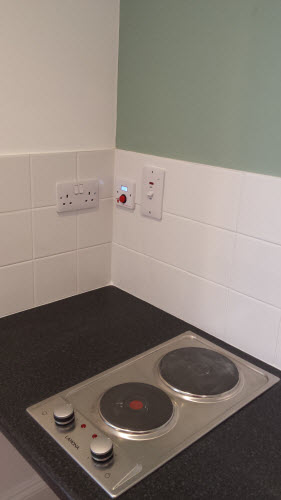


Hob, Grill and Oven Safety Timer
Kitchen Oven Guard.jpg
http://www.mckelvie-solutions.co.uk/ovenguard/images/sampledata/OvenGuard/Kitchen Oven Guard.jpg
Student accommodation hob oven guard.jpg
Oven Guard reduce risk of cooker fires.jpg
kitchen safety for cookers Oven Guard.jpg
Student cooker oven guard.jpg


User Configurable
The SwitchBox comes preprogrammed in software with a 30 minute countdown. When the red button is pressed the LCD countdown shows time remaining before the electrical supply is turned off. Different countdown times are available on request.
Easy to Use
Once installed OvenGuard is operated by the simple press of the red button on the SwitchBox. To turn off the electrical supply press the button again and the oven, hob and grill are turned off.
Installation
Easy to install by a qualified electrical engineer. OvenGuard is suitable for new installation and retro-fitting into existing kitchens to electrical ovens, hobs and grills to reduce the risk of cooker fires.
Advanced Stuff
Multilingual Support
In our templates all wordings of both back-end and front-end are moved to separated language files, so you can easily translate them into any language you want.
Interactive images presentation by JSN ImageShow extension
Responsive Layout
All JoomlaShine.com templates have special built-in design optimized for modern mobile devices iPhone, Android and Windows Mobile-based. The responsive design is applied for both Joomla 2.5 and 3.0 versions, and for Pro Edition only.
Unlike other template providers, we do not develop something that looks like a mobile app with heavy menu and animation. We built compact and lightweight version of the template preserving the whole original look-and-feel.
Mobile layout overview on Iphone

Mobile layout overview

Module positions in mobile layout
As default, all modules will be displayed on both desktop and mobile. To display a module on only desktop or on only mobile, you can add Module Class Suffix parameter as following:
- Display a module on only desktop: display-desktop
- Display a module on only mobile: display-mobile
Mobile layout overview on Ipad

Mobile layout overview on Ipad
Optimized HTML overrides for mobile

Article presentation (com_content)

News feeds presentation (com_newsfeeds)
We optimized HTML overrides for all default Joomla! extensions to make them looks neat in mobile edition. The work is mainly focused on rearrangement content from columns to rows.
Optimized menu for mobile
For mobile edition, we have built very simple, yet effective menu system, where all children menu items are presented as tree in collapsible panel. This menu system utilizes only little Javascript (MooTool) for expanding/collapsing submenu panels and is very fast and lightweight.

Special designed mobile menu system

Children menu items are presented as tree
Mobile Menu with icons and rich text
The most amazing thing is mobile menu inherits all the goodies of regular menu like icons and rich text.
Mobile menu with icons applied

Mobile menu with rich text
The responsive feature is enabled on live demo. You can check this by resizing the demo to the desired size and see how it presents on mobile devices.
Joomla! 2.5 & Joomla! 3.x Support

JSN Mico is natively compatible with both Joomla! 2.5 and Joomla! 3.x. The installation package is compatible with both Joomla CMS.

In Customer Area, you can choose to download appropriate installation file for the Joomla! version you are using.
Image Gallery
The image gallery you see on this website is the Free Edition of another cool product JSN ImageShow from JoomlaShine. Please click on the below button to check the PRO Edition of this extension.
This product is shipped with component, module and content plugin, so you can place it anywhere on every website.
On this page you can see how JSN ImageShow is presented as module on top and as plugin in article content. With it, you get smooth experience and consistent performance in all browsers. The JSN ImageShow also support mobile devices normally with JS/HTML version switched automatically when you visit the website.
Currently, JSN ImageShow comes with 6 themes: Theme Classic, Theme Slider, Theme Grid, Theme Carousel, Theme Strip and Theme Flow. More themes will be released in the future.
JSN ImageShow with Theme Classic
JSN ImageShow with Theme Slider
JSN ImageShow with Theme Grid
JSN ImageShow with Theme Carousel
JSN ImageShow with Theme Strip Vertical
JSN ImageShow with Theme Strip Horizontal
JSN ImageShow with Theme Flow
Mobile optimized
For mobile device, we have built special lightweight Javascript version, so you can be absolutely sure about images presentation.

OvenGuard SwitchBox
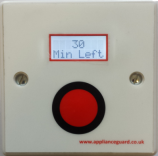
This innovative product is a simple, electrical safety device that sits discretely next to an electric cooker. The OvenGuard SwitchBox counts down the time remaining which is displayed in the LCD window and bleeps when there is one minute left.
OvenGuard GuardBox
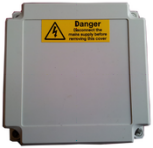
When the OvenGuard GuardBox receives the signal from the SwitchBox it turns on the electrical supply to the oven appliance. When the time has elapsed the signal is switched off, which turns off the electrical supply, making it safe if no one is in attendance.