

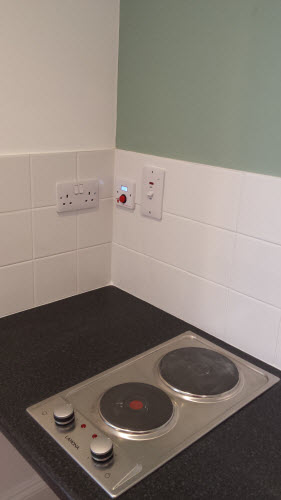


Hob, Grill and Oven Safety Timer
Kitchen Oven Guard.jpg
http://www.mckelvie-solutions.co.uk/ovenguard/images/sampledata/OvenGuard/Kitchen Oven Guard.jpg
Student accommodation hob oven guard.jpg
Oven Guard reduce risk of cooker fires.jpg
kitchen safety for cookers Oven Guard.jpg
Student cooker oven guard.jpg


User Configurable
The SwitchBox comes preprogrammed in software with a 30 minute countdown. When the red button is pressed the LCD countdown shows time remaining before the electrical supply is turned off. Different countdown times are available on request.
Easy to Use
Once installed OvenGuard is operated by the simple press of the red button on the SwitchBox. To turn off the electrical supply press the button again and the oven, hob and grill are turned off.
Installation
Easy to install by a qualified electrical engineer. OvenGuard is suitable for new installation and retro-fitting into existing kitchens to electrical ovens, hobs and grills to reduce the risk of cooker fires.
Template Details
Image Gallery
The image gallery you see on this website is the Free Edition of another cool product JSN ImageShow from JoomlaShine. Please click on the below button to check the PRO Edition of this extension.
This product is shipped with component, module and content plugin, so you can place it anywhere on every website.
On this page you can see how JSN ImageShow is presented as module on top and as plugin in article content. With it, you get smooth experience and consistent performance in all browsers. The JSN ImageShow also support mobile devices normally with JS/HTML version switched automatically when you visit the website.
Currently, JSN ImageShow comes with 6 themes: Theme Classic, Theme Slider, Theme Grid, Theme Carousel, Theme Strip and Theme Flow. More themes will be released in the future.
JSN ImageShow with Theme Classic
JSN ImageShow with Theme Slider
JSN ImageShow with Theme Grid
JSN ImageShow with Theme Carousel
JSN ImageShow with Theme Strip Vertical
JSN ImageShow with Theme Strip Horizontal
JSN ImageShow with Theme Flow
Mobile optimized
For mobile device, we have built special lightweight Javascript version, so you can be absolutely sure about images presentation.

Extended styles
One of hottest features in JSN Mico is extended styles adapted for 5 most popular Joomla! extension: K2, Community Builder, Virtue Mart, JEvents and JoomGallery.
Technically extended styles are overrides of default extensions style (images + CSS) and located in folder /ext inside template folder. Some extensions have their own template system and you might want to turn off extended style thru template parameter in order to use those native templates.
The extensions discussed here are not included in the template package and you have to download separately. You can download the extensions on Joomla! Extensions Directory http://extensions.joomla.org/
K2
Extended style for K2 includes adapted tabs color, additional module styles, fixed alignment issues and some other minor visual enhancement.
Component styling
Here is how K2 component will look like after extended styles applied.

Module styling
Besides from extended component styling you can use template module styles for K2 modules as well.

- K2 Content Module (mod_k2_content) with module style box-green jsn-icon-article applied

- K2 Comments Module (mod_k2_comments) with module style box-blue jsn-icon-comment applied
- K2 Login Module (mod_k2_login) with module style box-yellow jsn-icon-user applied
Community Builder
Extended style for Community Builder includes adapted dropdown menu style, tabs color, additional module styles and some other minor visual enhancement.
Component styling
Here is how Community Builder component will look like after extended styles applied.

Adapted drop-menu style and tabs color on CB Profile page
Module styling
Besides from extended component styling you can use template module styles for Community Builder modules as well.

In the example above:
- CB Login Module (mod_cblogin) with module style box-yellow jsn-icon-user applied
- CB Online Module (mod_comprofilerOnline) with module style box-blue jsn-icon-online applied
- CB Workflows (mod_comprofilermoderator) with module style box-grey jsn-icon-selection applied
Virtue Mart
Extended style for Virtue Mart includes adapted Add to Cart button, additional module styles, fixed alignment issues, redesigned checkout-steps icons and some other minor visual enhancement.
Component Styling

Fixed alignment issues on Product Details page
Module styling
Besides from extended component styling you can use template module styles for Virtue Mart modules as well.

- VirtueMart Module (mod_virtuemart) with module style box-blue jsn-icon-cart applied.
JEvents
Extended style for JEvents includes redesigned calendar navigation icons and calendar table, adapted table header color, additional module styles, fixed alignment issues and some other minor visual enhancement.
Component Styling

Totally redesigned calendar navigation icons

Adapted calendar table header color

Adapted table header color on Event List page
Module styling
Besides from extended component styling you can use template module styles for JEvents modules as well.

In the example above:
- Events Calendar Module (mod_jevents_cal) with module style box-blue jsn-icon-calendar applied.
- Latest Events Module (mod_jevents_latest) with module style box-green jsn-icon-star applied.
- JEvents Legend Module (mod_jevents_legend) with module style box-grey jsn-icon-info applied.
JoomGallery
Extended style for JoomGallery includes redesigned navigation icons, fixed alignment issues, additional module styles and some other minor visual enhancement.
Component Styling

Totally redesigned navigation bar and information panel

Fixed alignment issues
Module styling
Besides from extended component styling you can use template module styles for JoomGallery modules as well.

- JoomSearch Module (mod_joomsearch) with module style box-blue jsn-icon-search applied.
- JoomGallery Treeview Module (mod_jgtreeview) with module style box-yellow jsn-icon-image applied.

- JoomGallery Latest Categories Module (mod_jglatestcart) with module style box-grey jsn-icon-star applied.
- JoomGallery Stats Module (mod_joomgallerystats) with module style box-green jsn-icon-statistics applied.
User Configurable
The Switchbox is preprogrammed with a 30 minute countdown which can not be changed by the user. The LCD displays a 30 minute countdown giving a visual display on time remaining before the electrical supply is turned off.
Step 1. Setup sample data
Go to template settings page and click button "Get started".

There are 2 options for you to choose: Install sample data on your current Joomla site or download the QuickStart package to install a full package of Joomla CMS, JSN Mico template and sample data.

The installation process would start instantly and you would get the website in less than a minute.
Step 2. Read template documentation and start playing

Done! Just 2 simple steps and you have sample data installed.
Now it's time to read documentation and play with the template. You can download documentation package for free.
Docs & Support
Documentation
JSN Yoyo is equipped with very comprehensive documentation package that will help you with template utilization.
Configuration Manual
This PDF document gives you detailed description of every template feature. You can print and use this document as a reference every time you want to configure your template. You also can watch our play list JoomlaShine Template Configuration.Customization Manual
This PDF document gives you easy-to-understand instruction how to customize template elements to make it suites you or your client. You also can watch our playlist JoomlaShine Template Customization.
Support
Technical support is available for everyone who use our products via Support Forum. Here you will find forums for FREE and PRO editions owners and get support from our support team as well as thousands of active members.
When purchasing our products you are backed up with professional and timely support, 12-hour response time is guaranteed for PRO editions owners only.
OvenGuard SwitchBox
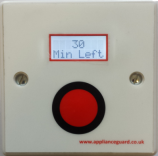
This innovative product is a simple, electrical safety device that sits discretely next to an electric cooker. The OvenGuard SwitchBox counts down the time remaining which is displayed in the LCD window and bleeps when there is one minute left.
OvenGuard GuardBox
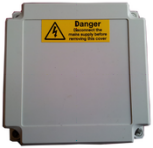
When the OvenGuard GuardBox receives the signal from the SwitchBox it turns on the electrical supply to the oven appliance. When the time has elapsed the signal is switched off, which turns off the electrical supply, making it safe if no one is in attendance.