

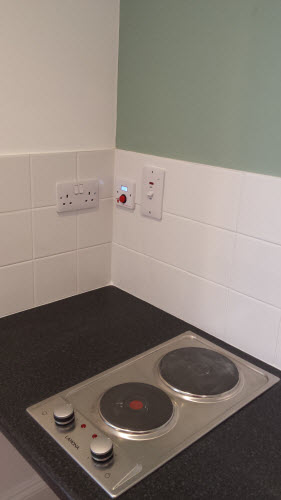


Hob, Grill and Oven Safety Timer
Kitchen Oven Guard.jpg
http://www.mckelvie-solutions.co.uk/ovenguard/images/sampledata/OvenGuard/Kitchen Oven Guard.jpg
Student accommodation hob oven guard.jpg
Oven Guard reduce risk of cooker fires.jpg
kitchen safety for cookers Oven Guard.jpg
Student cooker oven guard.jpg


User Configurable
The SwitchBox comes preprogrammed in software with a 30 minute countdown. When the red button is pressed the LCD countdown shows time remaining before the electrical supply is turned off. Different countdown times are available on request.
Easy to Use
Once installed OvenGuard is operated by the simple press of the red button on the SwitchBox. To turn off the electrical supply press the button again and the oven, hob and grill are turned off.
Installation
Easy to install by a qualified electrical engineer. OvenGuard is suitable for new installation and retro-fitting into existing kitchens to electrical ovens, hobs and grills to reduce the risk of cooker fires.
Joomla!
Thanks for filling out form
Woo hoo! Thanks for filling out the form!
We'll take into consideration your opinion then implement it into the further product's development process. The opinion you give helps to shape the products you receive.
Please use the code JSNPOLL5 to get $5 OFF when purchase any products from JoomlaShine. (Not applied with other promotions)
Check JoomlaShine Templates -> http://www.joomlashine.com/joomla-templates.html
Check JoomlaShine Extensions -> http://www.joomlashine.com/joomla-extensions.html
To be informed about latest news from JoomlaShine Team:
Twitter: https://twitter.com/joomlashine
Facebook: www.facebook.com/joomlashine
Professionals
Joomla! 1.6 continues development of the Joomla Framework and CMS as a powerful and flexible way to bring your vision of the web to reality. With the administrator now fully MVC, the ability to control its look and the management of extensions is now complete.
Administrator Components
All components also are used in the administrator area of your website. In addition to the ones listed here, there are components in the administrator that do not have direct front end displays, but do help shape your site. The most important ones for most users are
- Media Manager
- Extensions Manager
- Menu Manager
- Global Configuration
- Banners
- Redirect
Â
Media Manager
The media manager component lets you upload and insert images into content throughout your site. Optionally, you can enable the flash uploader which will allow you to to upload multiple images. Help
Extensions Manager
The extensions manager lets you install, update, uninstall and manage all of your extensions. The extensions manager has been extensively redesigned for Joomla! 1.6, although the core install and uninstall functionality remains the same as in Joomla 1.5. Help
Menu Manager
The menu manager lets you create the menus you see displayed on your site. It also allows you to assign modules and template styles to specific menu links. Help
Global Configuration
The global configuration is where the site administrator configures things such as whether search engine friendly urls are enabled, the site meta data (descriptive text used by search engines an indexers) and other functions. For many beginning users simply leaving the settings on default is a good way to begin, although when your site is ready for the public you will want to change the meta data to match its content. Help
Banners
The banners component provides a simple way to display a rotating image in a module and, if you wish to have advertising, a way to track the number of times an image is viewed and clicked. Help
Redirect
The redirect component is used to manage broken links that produce Page Not Found (404) errors. If enabled it will allow you to redirect broken links to specific pages. It can also be used to manage migration related URL changes. Help
Archive Module
This module shows a list of the calendar months containing archived articles. After you have changed the status of an article to archived, this list will be automatically generated. Help
Article Categories Module
This module displays a list of categories from one parent category. Help
Â
Subcategories
Extensions
The Joomla! content management system lets you create webpages of various types using extensions. There are 5 basic types of extensions: components, modules, templates, languages, and plugins. Your website includes the extensions you need to create a basic website in English, but thousands of additional extensions of all types are available. The Joomla! Extensions Directory is the largest directory of Joomla! extensions.
OvenGuard SwitchBox
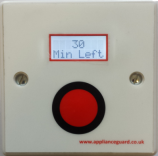
This innovative product is a simple, electrical safety device that sits discretely next to an electric cooker. The OvenGuard SwitchBox counts down the time remaining which is displayed in the LCD window and bleeps when there is one minute left.
OvenGuard GuardBox
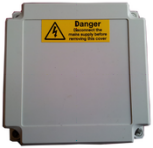
When the OvenGuard GuardBox receives the signal from the SwitchBox it turns on the electrical supply to the oven appliance. When the time has elapsed the signal is switched off, which turns off the electrical supply, making it safe if no one is in attendance.