

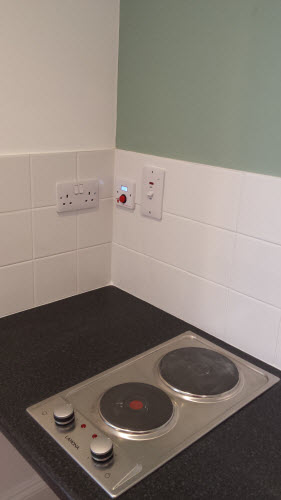


Hob, Grill and Oven Safety Timer
Kitchen Oven Guard.jpg
http://www.mckelvie-solutions.co.uk/ovenguard/images/sampledata/OvenGuard/Kitchen Oven Guard.jpg
Student accommodation hob oven guard.jpg
Oven Guard reduce risk of cooker fires.jpg
kitchen safety for cookers Oven Guard.jpg
Student cooker oven guard.jpg


User Configurable
The SwitchBox comes preprogrammed in software with a 30 minute countdown. When the red button is pressed the LCD countdown shows time remaining before the electrical supply is turned off. Different countdown times are available on request.
Easy to Use
Once installed OvenGuard is operated by the simple press of the red button on the SwitchBox. To turn off the electrical supply press the button again and the oven, hob and grill are turned off.
Installation
Easy to install by a qualified electrical engineer. OvenGuard is suitable for new installation and retro-fitting into existing kitchens to electrical ovens, hobs and grills to reduce the risk of cooker fires.
Design & Features
Font Styles
Font Face
JSN Mico provides 3 font face options for major website types. Each font face option is actually a combination of 2 font types: one for content text, another for heading text and main navigation text.
Special Font (powered by Google Font Directory)
To make your website content look even better, we included feature to load special fonts directly from Google Font Directory. We have carefully selected the most appropriate special font for each text styles. Since this service is provided by Google, it's very reliable and fast.
Click on any screenshot to see LIVE demo of that font face. (reset to default)

"Business / Corporation" style with special font

"Personal / Blog" style with special font

"Online News / Magazine" style with special font
Font Size
JSN Mico provides 3 text size options for major website audience.
Click on any screenshot to see LIVE demo of that font size. (reset to default)

Small font size

Medium font size

Big font size
Color Variations
JSN Mico provides 6 major color variations for your taste. Each color variation covers not only the main background, but also color of drop-down menu, links, table's header and some others.
Color variations
Click on any screenshot to LIVE demo of that color variation. (reset to default)
Interactive images presentation by JSN ImageShow extension
Color configuration
Each template color can be configured by 3 different ways:
By template parameter

Template color can be set by template parameter Template Color in administration panel.
By "Page Class Suffix"

Template color can be defined in parameter Page Class Suffix of menu items as custom-color-xxx.
By Site tools panel

Template color can be selected by website visitor from Color Selector in Site tools.
OvenGuard SwitchBox
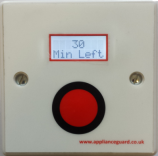
This innovative product is a simple, electrical safety device that sits discretely next to an electric cooker. The OvenGuard SwitchBox counts down the time remaining which is displayed in the LCD window and bleeps when there is one minute left.
OvenGuard GuardBox
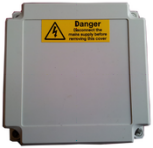
When the OvenGuard GuardBox receives the signal from the SwitchBox it turns on the electrical supply to the oven appliance. When the time has elapsed the signal is switched off, which turns off the electrical supply, making it safe if no one is in attendance.