


Hob, Grill and Oven Safety Timer
Kitchen Oven Guard.jpg
http://www.mckelvie-solutions.co.uk/ovenguard/images/sampledata/OvenGuard/Kitchen Oven Guard.jpg
Student accommodation hob oven guard.jpg
Oven Guard reduce risk of cooker fires.jpg
kitchen safety for cookers Oven Guard.jpg
Student cooker oven guard.jpg


User Configurable
The SwitchBox comes preprogrammed in software with a 30 minute countdown. When the red button is pressed the LCD countdown shows time remaining before the electrical supply is turned off. Different countdown times are available on request.
Easy to Use
Once installed OvenGuard is operated by the simple press of the red button on the SwitchBox. To turn off the electrical supply press the button again and the oven, hob and grill are turned off.
Installation
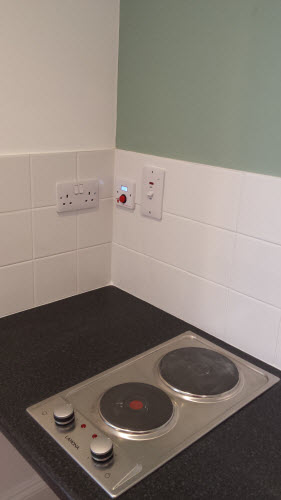
Easy to install by a qualified electrical engineer. OvenGuard is suitable for new installation and retro-fitting into existing kitchens to electrical ovens, hobs and grills to reduce the risk of cooker fires.
Modules
Menu Module
This module displays a menu on the site (frontend). Â Menus can be displayed in a wide variety of ways by using the menu options and css menu styles. Help
Most Read Content
This Module shows a list of the currently published Articles which have the highest number of page views. Help
News Flash
Displays a set number of articles from a category based on date or random selection. Help
Random Image Module
This Module displays a random image from your chosen image directory. Help
Related Items Module
This Module displays other Articles that are related to the one currently being viewed. These relations are established by the Meta Keywords.  All the keywords of the current Article are searched against all the keywords of all other published articles. Help
Subcategories
Content Modules
Content modules display article and other information from the content component.
User Modules
User modules interact with the user system, allowing users to login, showing who is logged in, and showing the most recently registered users.
Display Modules
These modules display information from components other than content and user. These include weblinks, news feeds and the media manager.
Utility Modules
Utility modules provide useful functionality such as search, syndication, and statistics.
Navigation Modules
Navigation modules help your visitors move through your site and find what they need.
Menus provide your site with structure and help your visitors navigate your site. Â Although they are all based on the same menu module, the variety of ways menus are used in the sample data show how flexible this module is.
A menu can range from extremely simple (for example the top menu or the menu for the Australian Parks sample site) to extremely complex (for example the About Joomla! menu with its many levels). They can also be used for other types of presentation such as the site map linked from the "This Site" menu.
Breadcrumbs provide users with information about where they are in a site.
OvenGuard SwitchBox
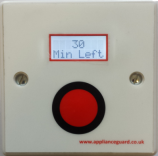
This innovative product is a simple, electrical safety device that sits discretely next to an electric cooker. The OvenGuard SwitchBox counts down the time remaining which is displayed in the LCD window and bleeps when there is one minute left.
OvenGuard GuardBox
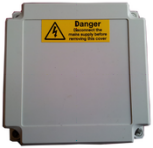
When the OvenGuard GuardBox receives the signal from the SwitchBox it turns on the electrical supply to the oven appliance. When the time has elapsed the signal is switched off, which turns off the electrical supply, making it safe if no one is in attendance.