

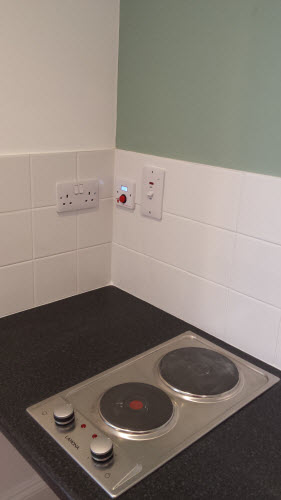


Hob, Grill and Oven Safety Timer
Kitchen Oven Guard.jpg
http://www.mckelvie-solutions.co.uk/ovenguard/images/sampledata/OvenGuard/Kitchen Oven Guard.jpg
Student accommodation hob oven guard.jpg
Oven Guard reduce risk of cooker fires.jpg
kitchen safety for cookers Oven Guard.jpg
Student cooker oven guard.jpg
User Configurable
The SwitchBox comes preprogrammed in software with a 30 minute countdown. When the red button is pressed the LCD countdown shows time remaining before the electrical supply is turned off. Different countdown times are available on request.
Easy to Use
Once installed OvenGuard is operated by the simple press of the red button on the SwitchBox. To turn off the electrical supply press the button again and the oven, hob and grill are turned off.
Installation
Easy to install by a qualified electrical engineer. OvenGuard is suitable for new installation and retro-fitting into existing kitchens to electrical ovens, hobs and grills to reduce the risk of cooker fires.
Extensions
Editors
Editors are used thoughout Joomla! where content is created. TinyMCE is the default choice in most locations although CodeMirror is used in the template manager. No Editor provides a text box for html content.
Default on:
- CodeMirror Help
- TinyMCE Help
- No Editor Help
Default off:
- None
Editors-xtd
These plugins are behind the buttons found beneath your editor. They only run when an editor plugin runs.
Default on:
- Editor Button: Image
- Editor Button: Readmore
- Editor Button: Page Break
- Editor Button: Article
Default off:
- None
Feed Display
This module allows the displaying of a syndicated feed. Help
Language Switcher
The language switcher module allows you to take advantage of the language tags that are available when content, modules and menu links are created.
This module displays a list of available Content Languages for switching between them.
When switching languages, it redirects to the Home page defined for the chosen language. Thereafter, the navigation will be the one defined for that language.
The language filter plugin must be enabled for this module to work properly.
To view an example of the language switch moduler module, go to the site administrator and enable the language filter plugin and the language switcher module labellled "language switcher" and visit the fruit shop or park sample sites. Then follow the instructions in this tutorial.
Subcategories
Components
 Components are larger extensions that produce the major content for your site. Each component has one or more "views" that control how content is displayed.In the Joomla! administrator there are additional extensions suce as Menus, Redirection, and the extension managers.
Modules
 Modules are small blocks of content that can be displayed in positions on a web page. The menus on this site are displayed in modules. The core of Joomla! includes 17 separate modules ranging from login to search to random images. Each module has a name that starts mod_ but when it displays it has a title. In the descriptions in this section, the titles are the same as the names.
 Templates give your site its look and feel. They determine layout, colors, type faces, graphics and other aspects of design that make your site unique. Your installation of Joomla comes prepackaged with four templates.
  Plugins are small task oriented extensions that enhance the Joomla! framework. Some are associated with particular extensions and others, such as editors, are used across all of Joomla!. Most beginning users do not need to change any of the plugins that install with Joomla!.


OvenGuard SwitchBox
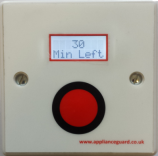
This innovative product is a simple, electrical safety device that sits discretely next to an electric cooker. The OvenGuard SwitchBox counts down the time remaining which is displayed in the LCD window and bleeps when there is one minute left.
OvenGuard GuardBox
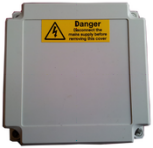
When the OvenGuard GuardBox receives the signal from the SwitchBox it turns on the electrical supply to the oven appliance. When the time has elapsed the signal is switched off, which turns off the electrical supply, making it safe if no one is in attendance.